Engineering
Enable Secure AI Agents with Airbyte File Transfers
In the AI and data community, it is quite useful to create AI applications that consolidate loads of information in a structured and appealing way, while allowing users to query for specific content. With the sheer quantity of data in most organizations, how to efficiently transport, organize, and leverage vast amounts of unstructured information scattered across digital landscapes becomes increasingly pertinent.
Organizations tend to create documents to socialize, inform, document, register, and perform other business operations. Over time, these documents accumulate and create knowledge silos that are hard to navigate without explicitly reading them - and let's be honest, who wants to read through all that content? A chatbot or even an AI agent that reads from these documents in the right manner can process and relay this information as if it were a senior employee of the organization.
As nice as new chatbots may sound, they do create a crucial security challenge. Sharing access controls (permissions) is important to maintain consistency across platforms. You don't want the new intern discovering sensitive information such as how much the marketing leader earned last year. To maintain proper permission boundaries, we need to replicate both the content and the permissions metadata from Google Drive. When files hold payroll numbers or PII, pre-processing helps lightweight steps like sensitive content masking keep confidential details out of downstream stores and chat answers.
In this post, we will dive into how Airbyte's Google Drive connector handles different types of file transfers and, most importantly, how its Permission Access Control List (ACL) syncing feature enables you to build secure document chatbots that respect existing access controls.
Google Drive: Information Buried in Folders
Let's start with the basic case of Google Drive files within an organization. Unless there are dedicated systems to navigate through these files, it is quite difficult to find valuable information as it can be buried in some random folder, only accessible when someone explicitly knows what to search for. This may slow down people from actually being able to access relevant knowledge at a crucial time. How inconvenient!
If we had an AI Agent to quickly access and understand the necessary documents in this organization, imagine how much productivity would increase, and yet, it's so hard to implement! Why is it tricky, you may ask?
Well, what if someone that doesn't have access to sensitive information is prompting, and the AI grants them access to something confidential? Traditionally, you would deal with this issue by firstly having the raw Google Drive API or specialized SDKs such as Paragon, and create custom solutions potentially using webhooks at query time. For each user prompt, you would need to perform a series of checks that validate the user's identity, check permissions against Google Drive's access controls, retrieve authorized content, and process the same content for the AI response. This might cause unnecessary latency, complex authentication flows, and numerous potential security failures (risk of over-permissioning). Don't even get started with the amount of extra dev time this may take!
Our Solution: Comprehensive File Transfer with Permission Controls
Airbyte offers a robust solution to this challenge through its enhanced file transfer capabilities, particularly with its Google Drive connector.
Rather than writing a Google Drive integration, which involves complex and lengthy code, you can now use Airbyte’s ready-to-use connectors to replicate file content and critical permission metadata.
Airbyte's unique approach entails systematically replicating both content and permissions into a consolidated, secure data environment where AI systems can efficiently operate while maintaining security boundaries! Moreover, with incremental sync capabilities that automatically detect and transfer only new or modified files, data freshness is also addressed without manual intervention. You could configure syncs to run on schedules (hourly, daily) or trigger them programmatically via the API as part of your data pipeline. Let’s jump into how this looks on Airbyte Cloud.
Data Ingestion Flow
When connecting Google Drive to any destination which could help us build an AI pipeline, we need a comprehensive approach to handling different types of data.
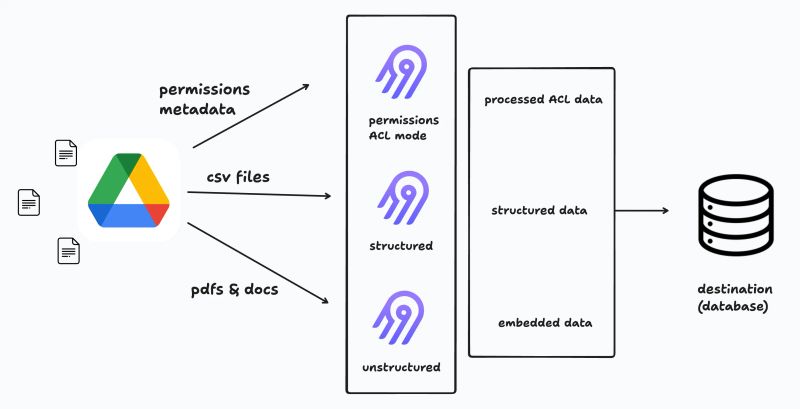
As you can see from our architecture diagram, we can see Airbyte’s three parallel processing paths:
- Permissions metadata extraction using Drive’s permissions API endpoints
- Structured data normalization for CSV and spreadsheet content
- Document parsing that converts PDFs and docs (unstructured) to database-friendly formats
Here we see that Airbyte acts as the central pipeline, processing all three data types and delivering them to a destination database (in this case could be something like Postgres SQL PGVector or maybe Pinecone, a common vector database), where they can be accessed by AI applications while maintaining permission boundaries.
Types of Data Syncs
Airbyte handles these different data streams through distinct sync types:
1. Copying Raw Files
This transfers files between systems without parsing their contents. Raw files are simply moved from Google Drive to a destination like S3, preserving their original format and data integrity. Raw file movement is particularly useful for binary files (like images, audio, or executables) or when post-processing will be handled by downstream systems.
This method preserves file integrity by maintaining exact byte-for-byte copies and supports incremental syncs based on file modification timestamps, minimizing bandwidth usage for large file collections. The setup would look somewhat like this:
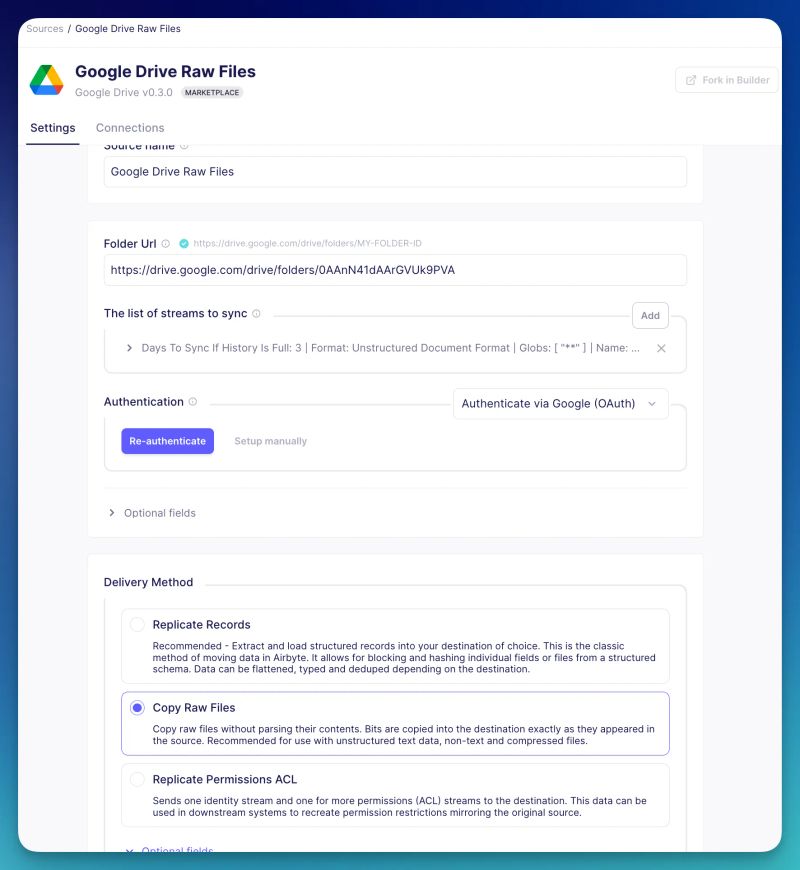
Note that in the above, the Google Drive folder format is important as Airbyte’s request expects it a certain way and this may error out if you don’t clean the URL you paste!
Why use S3 here? Well, it is ideal for raw file transfers from Google Drive as it acts as a flexible, intermediate storage layer that preserves files exactly as they were found without any processing, while providing efficient object storage that can be independently accessed by multiple downstream applications or processing workflows.
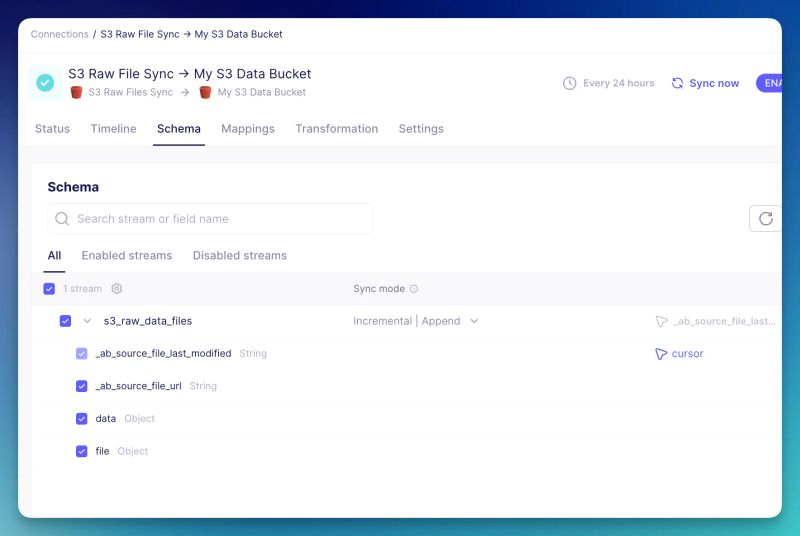
Here, notice the "Incremental | Append" sync mode configuration in the schema view. This ensures that subsequent sync operations will only process new or changed files, dramatically reducing processing time and API quota usage. This is particularly valuable for large Google Drive instances where full syncs would be prohibitively expensive.
2. Replicating Permissions
ACLs capture the full scope of what permissions individuals and groups have for files. Selecting the "Replicate Permissions ACL" option in the configuration UI allows these same permissions in the source to be kept up to date in the destination the files are being synced to.
This option:
- Sends one identity stream and one or more permissions (ACL) streams to the destination
- Creates standardized permission data that can be used in downstream systems
- Maintains the original permission restrictions from Google Drive
Here we see how a specific Google Drive source’s permissions metadata is transported over, not the files.
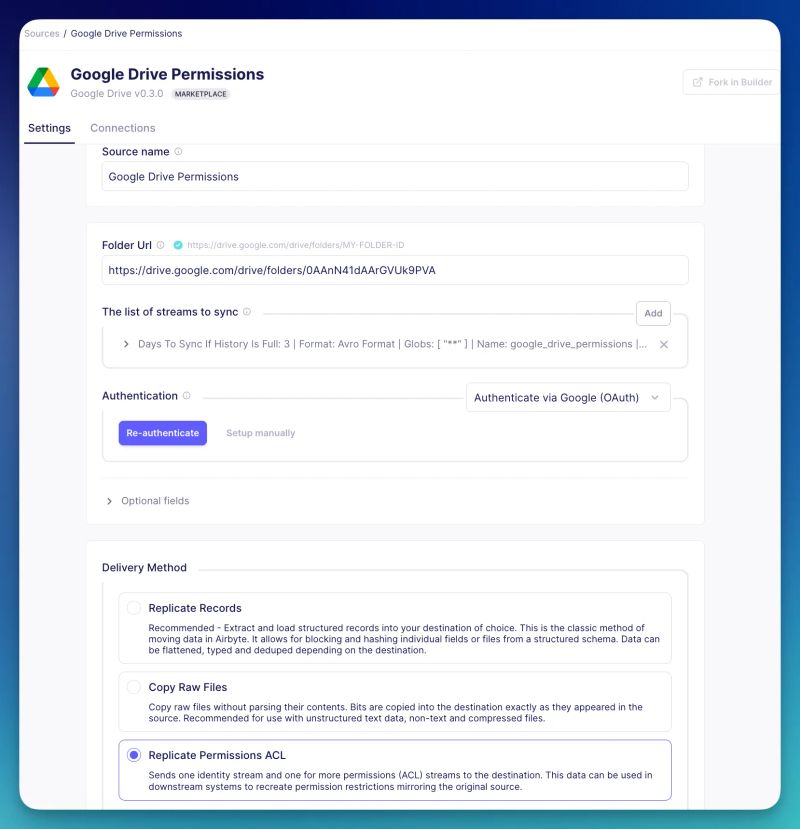
The permission data we are dealing with is structured in two main schemas:
- FILE_PERMISSIONS: Contains file_path, publicly_accessible flag, and allowed identity IDs
- IDENTITIES: Contains user/group information including email addresses and group membership
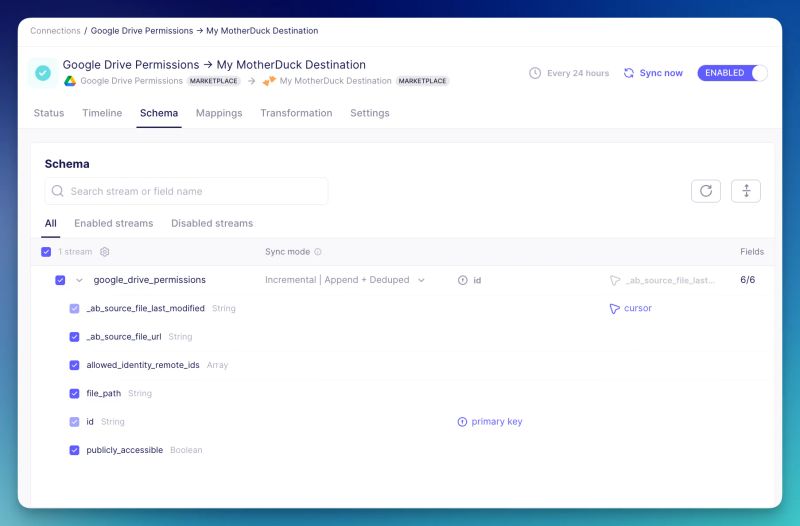
Having established a secure and permission-aware data transfer process, the next step involves transforming unstructured documents into a format that can be effectively consumed by AI systems.
3. Unstructured Document Parsing
This parses document files into markdown for AI consumption. By selecting the unstructured document format, you can transform various document types into a consistent format for processing by AI systems.
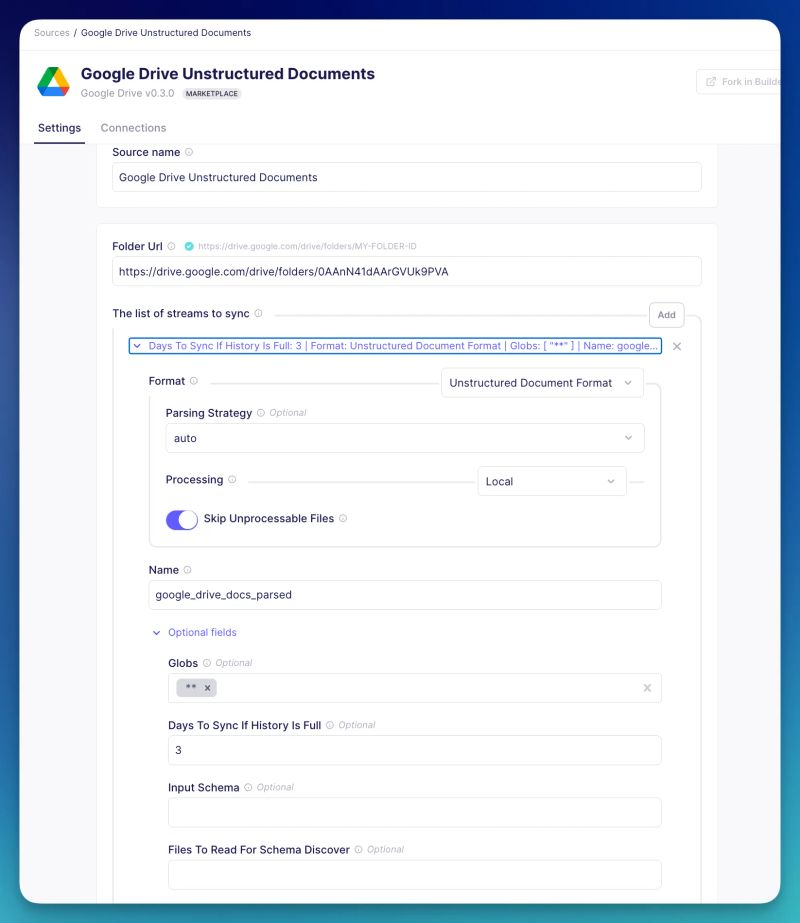
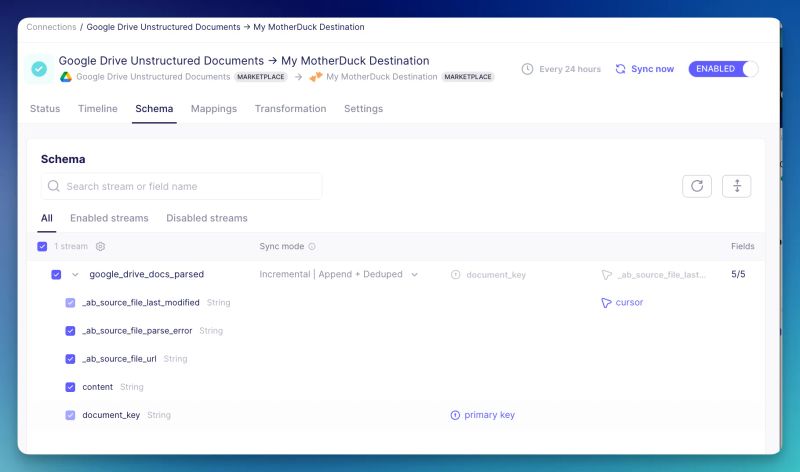
Here, we have selected the replicate records option, which allows us to properly parse and send the documents to MotherDuck, the single source of truth where we have permissions metadata as well as content in the same DB.
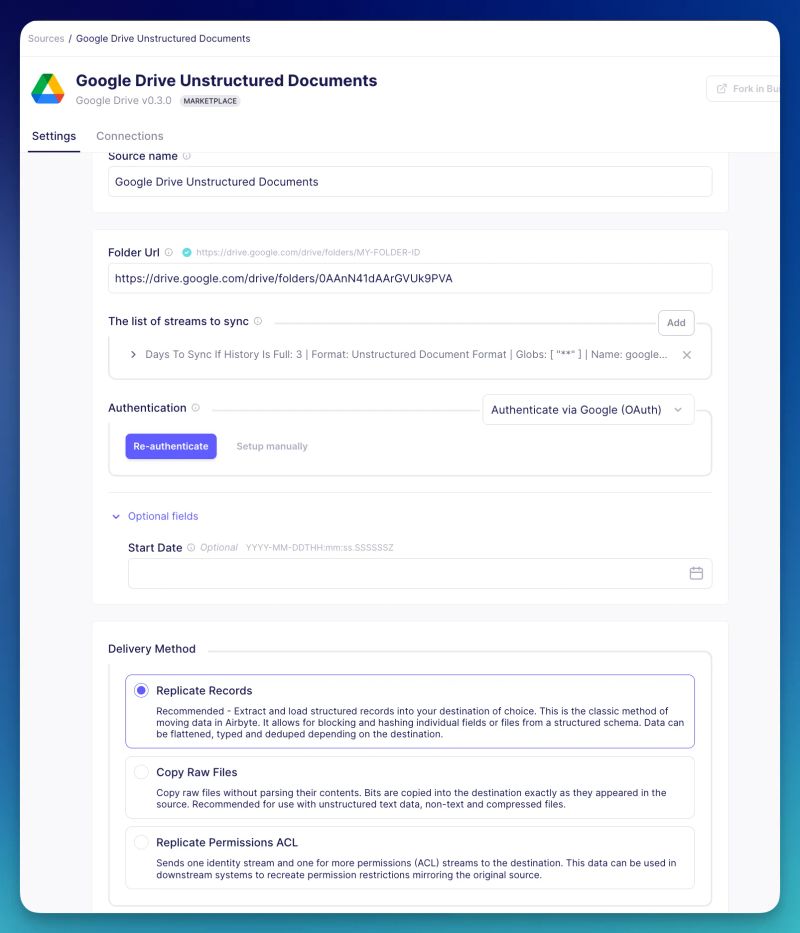
Here are the documents parsed being sent to MotherDuck via this stream:
Conclusion
Airbyte's flexible file transfer capabilities extend far beyond Google Drive. Whether you're working with Salesforce data, CSVs in MotherDuck, or files from any supported source, you can leverage these powerful sync methods to build sophisticated data pipelines and AI applications.
While we've showcased Google Drive as an example, Airbyte supports multiple methods for delivering source data to destinations, making it extremely versatile. S3 data or SFTP can also be used as a source with the supported delivery methods mentioned above!
You could build a secure enterprise knowledge base using Permission ACL Sync to maintain access controls, Unstructured Document Parsing to convert documents into AI-ready formats, and process these with your preferred embedding model. Store everything in a vector database with a query interface that checks user permissions before returning results.
This approach creates a powerful yet secure AI application that respects existing permission boundaries— powered by Airbyte pipelines, without complex custom code!
The beauty is its versatility. Apply the same pattern to Salesforce documents, SharePoint libraries, or any document repository. Imagine a single query interface where your team can ask questions about information across all your organization's systems, with each user only seeing responses they're authorized to access. This isn't theoretical—it's a practical solution you can build today using Airbyte's file transfer capabilities. That same permission-aware foundation is what makes it safe to build ai agents for marketing that touch customer profiles and campaign data without leaking anything they shouldn't.
Ready to build your own application with Airbyte? Start with a 14-day free trial and check out the product! We also have a Slack community to connect with other Airbyte users building cool stuff!